



Description
Download Trend Micro VPN- Safer VPN – Safe Internet, Secure Connection, Online Privacy, Unlimited Bandwidth, Geo-Restriction Bypass, Public Wi-Fi Protection
Overview
Trend Micro VPN- Safer VPN is a mobile application designed to enhance online privacy and security for users across the globe. The app provides fast, unlimited internet access while safeguarding user data through advanced encryption and IP masking. Its primary purpose is to protect users when browsing on public Wi-Fi networks, which are often vulnerable to cyber threats. By encrypting internet traffic and hiding the user’s IP address, the app helps maintain anonymity and prevents unauthorized tracking. This makes it particularly useful for individuals who frequently use cafes, airports, or hotel networks where security is not guaranteed.
The target audience includes privacy-conscious users, frequent travelers, remote workers, and those who wish to access geo-restricted content such as streaming platforms or region-specific websites. The app is positioned as a reliable tool within the growing productivity and security app ecosystem, offering a balance between performance and protection. Trend Micro, known for its cybersecurity solutions, brings a trusted brand to the mobile VPN space, reinforcing user confidence in the app’s capabilities.
Real-world use cases include securing online banking transactions, accessing international media libraries, and protecting personal data during remote work sessions. The inclusion of a 7-day free trial allows users to test the app’s features without financial commitment, making it accessible for evaluation. Although the developer did not provide additional technical details about server infrastructure or encryption protocols, the app’s core mission remains clear: to deliver a secure and unrestricted internet experience.
Key Features & Functionality
- Bypass Geo-Restrictions: By masking the user’s IP address, the app enables access to region-locked content such as international streaming services, online games, and websites restricted in certain countries. This feature is especially beneficial for users who travel frequently or wish to view content unavailable in their current location.
- Enhanced Online Security: The app automatically encrypts internet traffic and hides the user’s IP address, protecting identity and location from online trackers and potential cyber threats. This is critical when using public Wi-Fi networks where data interception is a common risk.
- Unlimited Bandwidth: Users can stream high-definition videos, play online games, and participate in live broadcasts without encountering data caps or speed throttling. This ensures a consistent and high-performance internet experience regardless of usage duration.
- Automatic Protection: The app activates automatically when connecting to unsecured networks, providing real-time protection without requiring manual intervention. This proactive safeguarding is ideal for users who may forget to enable a VPN manually.
- 24/7 Customer Support: Round-the-clock support from Trend Micro’s success team ensures users can resolve technical issues or clarify service-related queries at any time, contributing to a seamless user experience.
Each feature is designed with practicality in mind. For example, the automatic protection feature ensures that users remain secure even in high-risk environments like public airports. The unlimited bandwidth feature supports long-duration activities such as video conferencing or extended gaming sessions, making it suitable for both personal and professional use. These functionalities collectively address common concerns related to online privacy, connectivity, and data safety.
Interface, UX & Performance
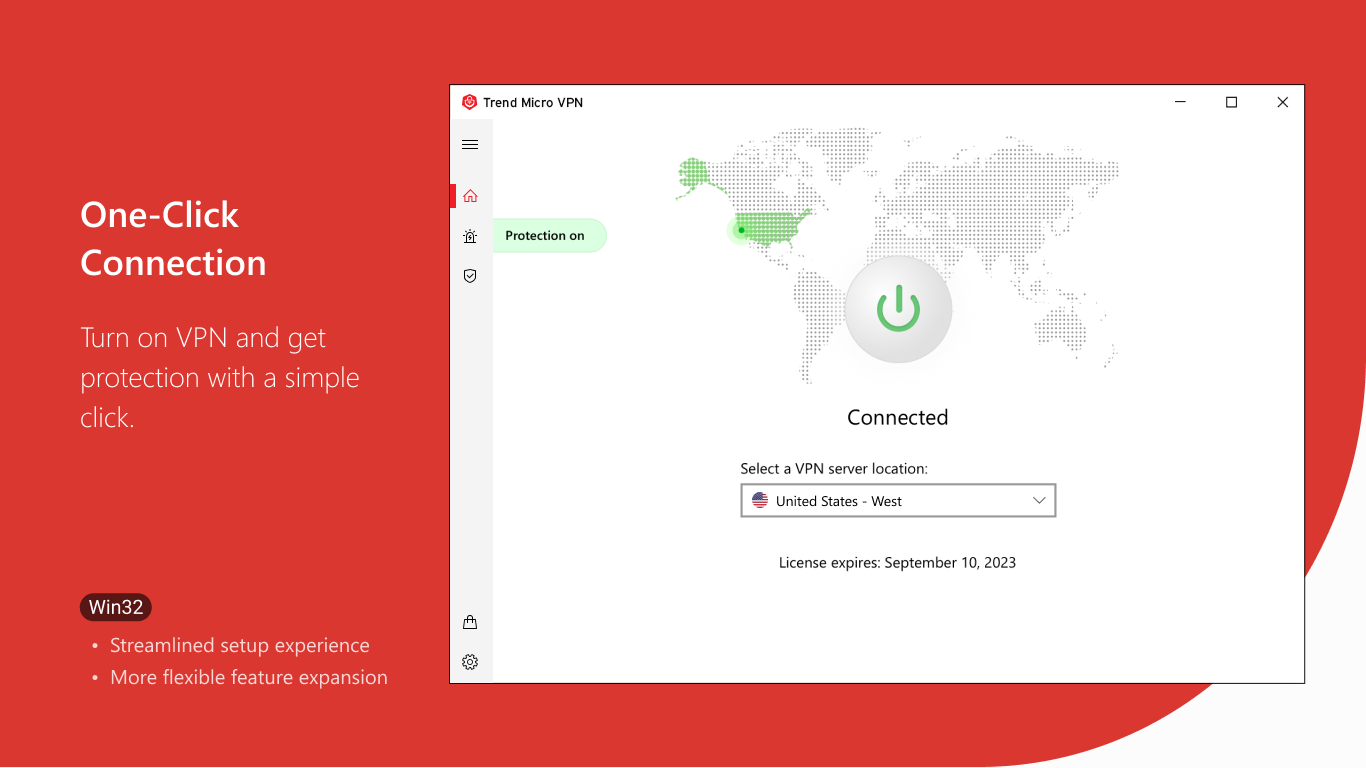
The user interface of Trend Micro VPN- Safer VPN appears to be designed with simplicity and efficiency in mind. The layout likely emphasizes core functions such as connection status, server selection, and quick access to settings. A clean visual style with intuitive icons and minimal clutter supports rapid navigation, allowing users to establish a secure connection with just a few taps.
Navigation flow is expected to be straightforward, with essential controls placed within easy reach. The app likely includes a status indicator showing whether the VPN is active, along with options to switch between servers or enable automatic protection. Although the developer did not list formal performance metrics, the app’s promise of fast and unlimited access suggests optimized routing and server deployment.
Performance on various device categories is not specified, but the app’s lightweight size of 22.5 MB indicates efficient resource usage. Responsiveness is likely consistent across mid-to-high-end Android devices, with minimal lag during connection changes. Stability appears to be a focus, given the emphasis on continuous protection, especially on public networks. However, specific details on battery impact, background behavior, or network switching reliability were not provided.
Platform Compatibility & Technical Requirements
Trend Micro VPN- Safer VPN is available exclusively on the Android platform. The current version is 1.1.0, with a file size of 22.5 MB. This suggests the app is optimized for mobile devices with moderate storage capacity, making it accessible to a wide range of users.
The developer did not specify minimum OS requirements or compatibility details beyond the platform. As such, users should verify device compatibility through official channels before installation. The app’s size and version indicate a focus on functionality over bloat, but specific performance behavior on older or lower-end Android devices remains unconfirmed.
Pros and Cons
Pros
- Offers fast and unlimited internet access with no data caps
- Provides automatic protection on unsecured networks
- Includes a 7-day free trial for risk-free evaluation
- Supports bypassing geo-restrictions for global content access
- 24/7 customer support ensures timely assistance
Cons
- Specific technical details about encryption protocols were not disclosed
- Compatibility with older Android versions was not confirmed
- Price point of $1.99 may be considered high for some users
- Developer did not provide information on battery usage or background performance
- Only available on Android; no iOS version listed
FAQ
Is Trend Micro VPN- Safer VPN safe to use?
Yes, the app is designed to protect online privacy by encrypting internet traffic and masking the user’s IP address. It is intended for secure browsing, especially on public Wi-Fi networks.
Can I use Trend Micro VPN- Safer VPN on multiple devices?
The app is available for Android devices. Specific details about multi-device support were not provided by the developer.
Does the app work on older Android versions?
The developer did not specify compatibility with older Android operating systems.
Is there a free version of the app?
A 7-day free trial is available, allowing users to test the app’s features before purchasing. After the trial, a subscription is required.
How do I update Trend Micro VPN- Safer VPN?
Updates are typically delivered through the Google Play Store. Users should ensure the app is enabled for automatic updates or check manually for new versions.
Final Thoughts
Trend Micro VPN- Safer VPN delivers a focused, privacy-first experience tailored for Android users seeking reliable online protection. With its emphasis on automatic security, unlimited bandwidth, and geo-restriction bypass, the app fills a critical need in today’s digital landscape. While detailed technical specifications are limited, the app’s core functionality is well-aligned with modern user demands for both security and freedom online.
It is best suited for individuals who prioritize online privacy, travel frequently, or require consistent access to global content. The inclusion of a free trial enhances accessibility, allowing users to assess its value before committing. For those using Android devices and concerned about public network risks, this app offers a practical solution with a clear value proposition.
Download Trend Micro VPN- Safer VPN now
Guides & Tutorials for Trend Micro VPN- Safer VPN
How to install Trend Micro VPN- Safer VPN
- Click the Preview / Download button above.
- Once redirected, accept the terms and click Install.
- Wait for the Trend Micro VPN- Safer VPN download to finish on your device.
How to use Trend Micro VPN- Safer VPN
This software is primarily used for its core features described above. Open the app after installation to explore its capabilities.
User Reviews for Trend Micro VPN- Safer VPN 0
No reviews found


